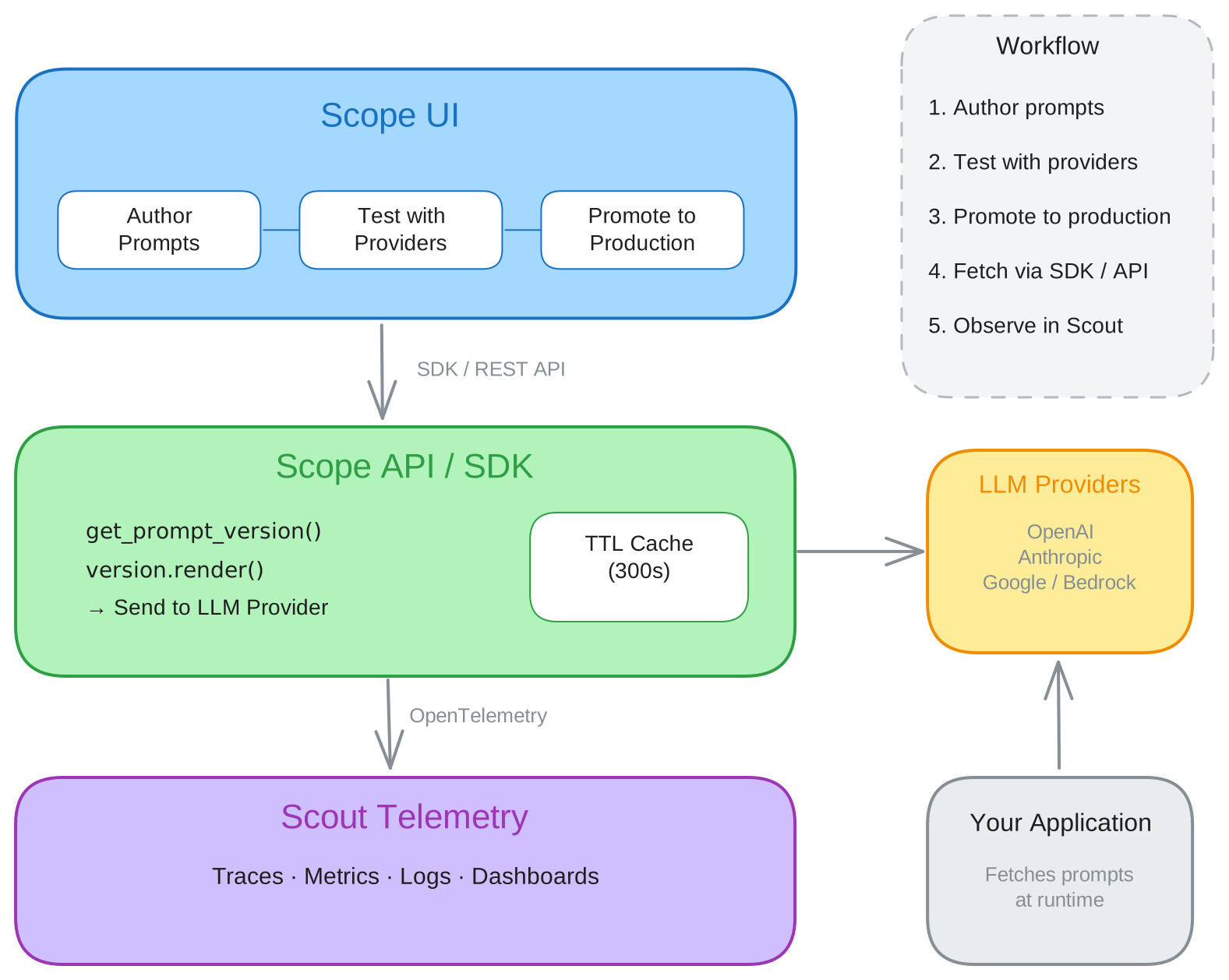
Core Concepts
This page introduces the key concepts you'll work with in Scope. Understanding these building blocks will help you navigate the platform and make the most of its features.
Prompts
A prompt is the central unit in Scope. Each prompt has a unique name, optional description, and tags for organization. Prompts act as containers for one or more versions of the actual content sent to an LLM.
When you create a prompt, Scope automatically creates a first version (v1) in
draft status. You can then iterate on the content, create new versions, and
promote the best one to production.
Key properties:
| Property | Description |
|---|---|
name | Unique identifier used to fetch the prompt via SDK or API |
description | Optional human-readable summary |
tags | Labels for filtering and organization |
latest_version | The most recently created version number |
production_version | The currently promoted version (if any) |
Versions
Each prompt has an ordered list of versions (v1, v2, v3, ...).
Versions are immutable once promoted — if you need to change a production
prompt, you create a new version and promote it instead.
Version Statuses
| Status | Meaning |
|---|---|
| Draft | Editable. Can be tested and modified freely. |
| Published | The active production version. Only one version per prompt can be published at a time. |
| Archived | Preserved for history but no longer in active use. Cannot be accidentally served. |
Version Lifecycle
Draft → Published → Archived
  ↑                    │
  └────────────────────┘
       (unarchive)
- A new version starts as draft
- Promoting a draft version sets it to published and archives (or demotes) the previous production version
- Archived versions can be unarchived back to draft status
See Working with Versions for step-by-step instructions.
Variables
Scope supports template variables using double-brace syntax:
{{variable_name}}. Variables are placeholders in your prompt content that get
replaced with actual values at runtime.
Example prompt content:
Summarize the following {{document_type}} for a {{audience}} audience:

{{content}}
Scope automatically detects variables when you save a prompt version. At
runtime, the SDK's render() method substitutes each placeholder with the value
you provide.
Variable names must be alphanumeric with underscores (e.g., user_name). They
are case-sensitive.
See Using Prompt Variables for details on variable detection, rendering, and error handling.
Promotion
Promotion is the process of moving a draft version to production. When you promote a version:
- The selected version's status changes to published
- The previously published version is automatically archived (or demoted to draft)
- All SDK and API consumers immediately receive the new version when they request the production prompt
Promotion is atomic — there's no window where two versions are simultaneously in production. Every promotion is recorded in the prompt's promotion history, which tracks who promoted which version, when, and with what notes.
See Promote to Production for the full workflow.
Providers
A provider represents a configured LLM service (e.g., OpenAI, Anthropic, Google). Providers are configured at the tenant level under Settings > Providers and require an API key for authentication.
Each provider exposes a set of models (e.g., gpt-4o, claude-3-opus). You
enable specific models for your tenant from the provider's model catalog.
Provider capabilities:
- Connection testing — verify your API key before saving
- Multiple configurations — configure the same provider type with different
API keys or base URLs using
config_name - Enable/disable — toggle providers without deleting their configuration
- Model management — enable, disable, and configure individual models per provider
See Configure Providers for setup instructions.
API Keys
API keys authenticate your application with the Scope API. Each key consists of:
- API Key — the public identifier
- API Secret — the private credential (shown only once at creation)
- Organization ID — your tenant identifier
The SDK uses these three values to obtain a JWT token, which it then uses for all subsequent API calls. Tokens are refreshed automatically before they expire.
Store your API secret securely. It cannot be retrieved after creation — if lost, you must create a new key.
See Manage API Keys for key creation and best practices.
Traces
Scope integrates with Scout to provide end-to-end observability for prompt executions. When a prompt is executed (either through the test panel or via the API), Scope records:
- The rendered prompt content
- Provider and model used
- Token counts (prompt, completion, total)
- Latency and estimated cost
- The LLM response
These execution records appear as traces in both Scope and Scout, allowing you to correlate prompt performance with your application's distributed traces and metrics.
See Viewing Traces for details on filtering and analyzing trace data.
How It All Fits Together