Testing Prompts
Scope includes a built-in test panel that lets you run prompts against real LLM providers, compare outputs across models, and review performance metrics — all before promoting to production.
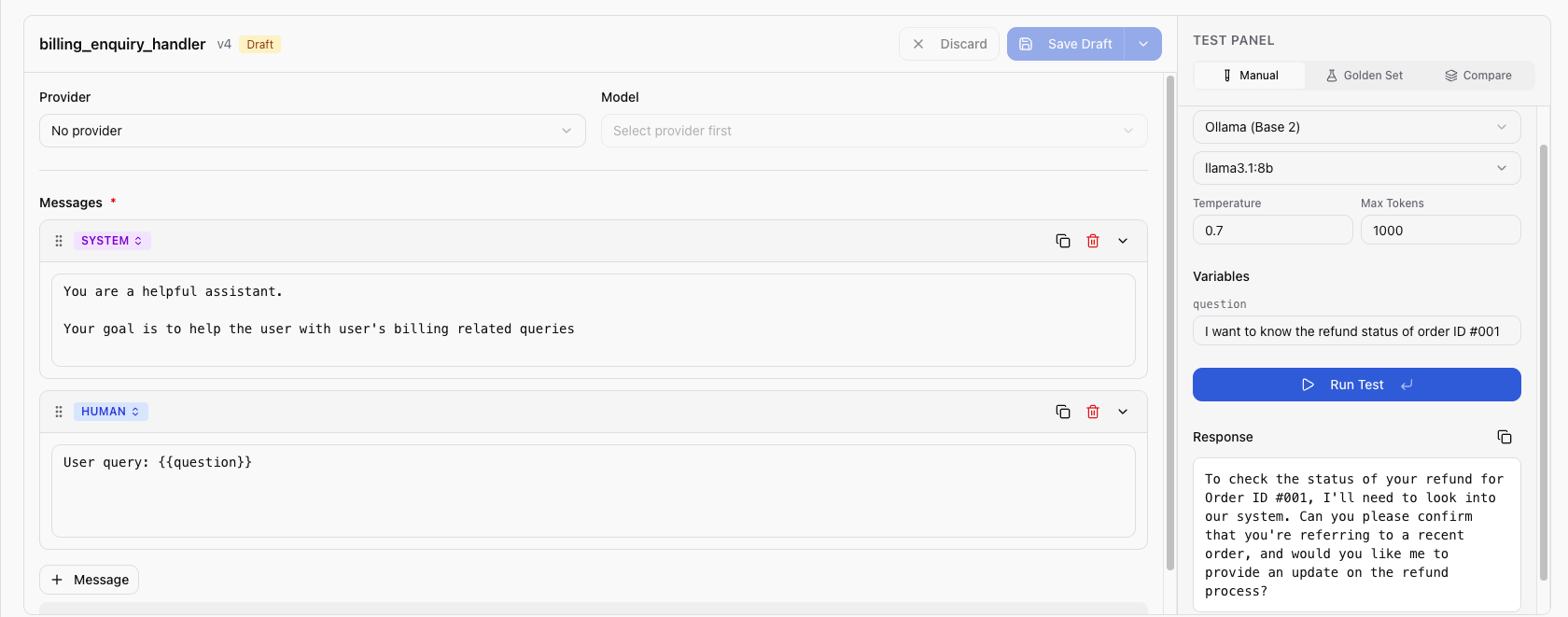
Using the Test Panel
- Open a prompt and select the version you want to test
- Click Test to open the test panel
- Configure the test:
- Provider — select a configured provider (e.g., OpenAI)
- Model — select a model from the provider (e.g.,
gpt-4o) - Variables — fill in values for each detected variable
- Model config (optional) — set parameters like
temperature,max_tokens
- Click Run
Understanding Results
After execution, the test panel displays:
| Metric | Description |
|---|---|
| Response | The LLM's generated output |
| Resolved content | Your prompt after variable substitution |
| Prompt tokens | Number of tokens in the input |
| Completion tokens | Number of tokens in the output |
| Total tokens | Combined input + output tokens |
| Latency | Response time in milliseconds |
| Cost | Estimated cost based on the model's pricing |
Multi-Model Comparison
Compare the same prompt across multiple models simultaneously:
- In the test panel, select Multi-model mode
- Add up to 10 provider/model combinations
- Fill in variable values (shared across all models)
- Click Run All
Results appear side-by-side, making it easy to compare response quality, latency, and cost across models.
Multi-model comparison is useful for choosing the best model for a prompt or validating that a cheaper model produces acceptable results.
Testing with History
Re-run a prompt using parameters from a previous execution:
- Select a previous execution from the test history
- Click Re-test or use the "Test with History" feature
- Scope runs the prompt with the same variables and model configuration
- Compare the new output with the original output side by side
This is useful for regression testing when you modify prompt content — you can verify that the new version produces similar or better results with the same inputs.
Next Steps
- Create Prompt from Trace — turn a real execution into a prompt
- Promote to Production — deploy a tested version
- Viewing Traces — analyze execution traces