Architecture
This page describes Scope's system architecture — the major components, how requests flow through the system, the technology stack, and integration points with Scout and external LLM providers.
Architecture Diagram
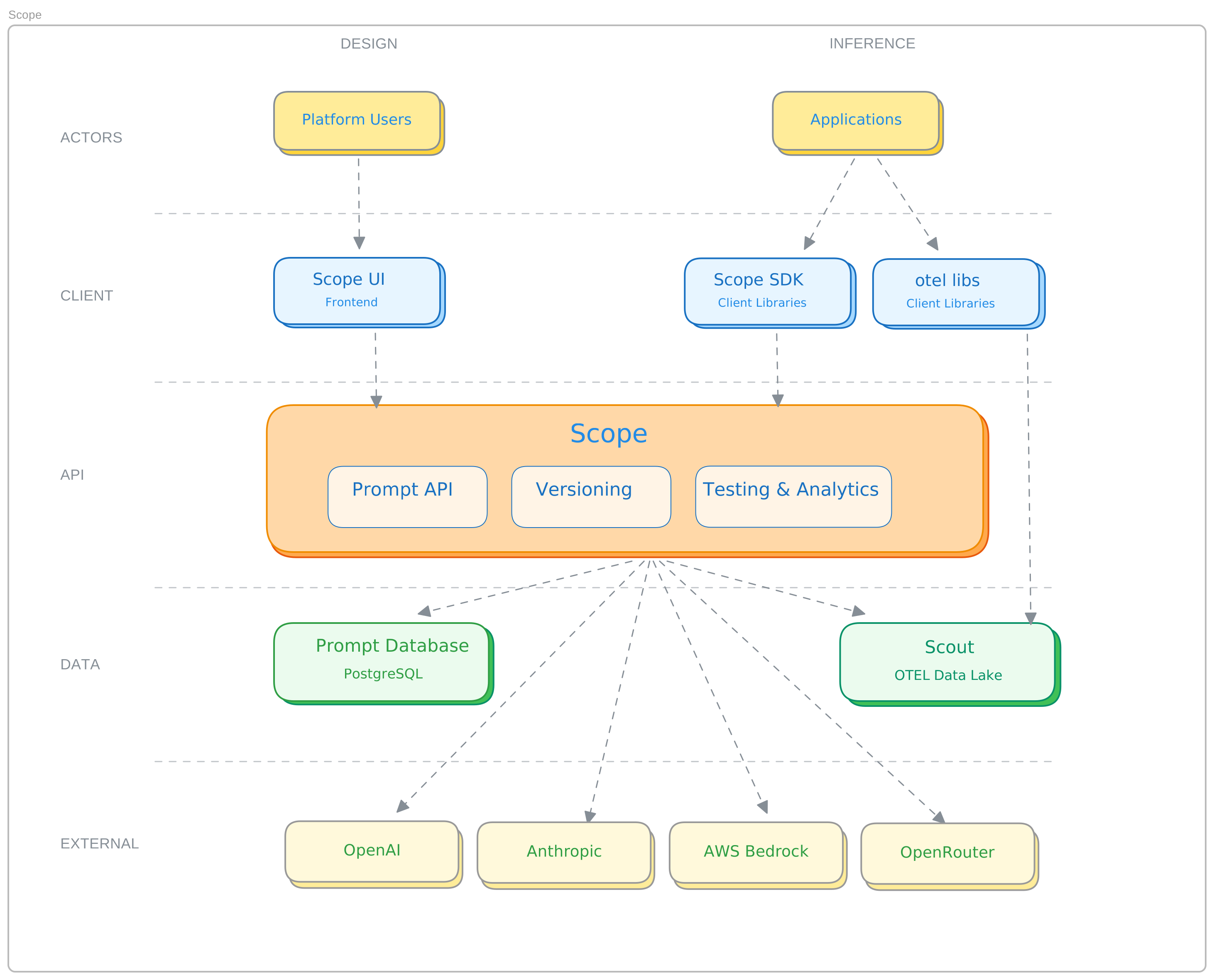
System Components
Scope UI
The web-based interface for prompt management, testing, and administration.
- Prompt editor — create and edit prompt content with syntax highlighting
for
{{variables}} - Test panel — execute prompts against providers, compare models, and review metrics
- Version management — browse, promote, archive, and unarchive versions
- Settings — configure providers, API keys, and user permissions
- Traces — browse and filter execution traces from Scout
Scope API
The Go-based REST API that powers all Scope operations.
- Prompt management — CRUD operations for prompts and versions
- Execution engine — sends prompts to LLM providers and records results
- Provider management — stores and manages provider configurations with encrypted credentials
- Authentication — JWT token issuance and validation
- Telemetry export — sends execution spans to Scout via OpenTelemetry
Key API characteristics:
- RESTful JSON API at
/api/v1 - JWT bearer token authentication
- Cursor-based pagination
- Structured error responses
Database
The primary data store for all Scope resources:
- Prompts — name, description, tags, tenant association
- Versions — content, variables, status, metadata, promotion history
- Providers — configuration, encrypted API keys, enabled models
- API keys — hashed secrets, usage tracking
- Golden sets — test datasets with items and test run results
- Users — roles and permissions
Authentication Service
Handles user identity and API key authentication:
- SSO integration for browser-based access
- API key → JWT token exchange for programmatic access
- Token lifecycle management (issuance, validation, refresh)
Request Flow
Prompt Fetch (SDK)
Application → SDK → Auth API → JWT Token
                  → Scope API → Database → Prompt Version
                  → (cached locally for TTL)
- The SDK exchanges API key credentials for a JWT token
- The SDK calls
GET /api/v1/prompts/{name}/production - The API authenticates the token and resolves the tenant
- The API queries Database for the production version
- The version is returned and cached by the SDK
Prompt Execution (Test Panel / API)
User/API → Scope API → Database (fetch version)
                     → Render variables
                     → LLM Provider (execute)
                     → Database (store result)
                     → Scout (export span)
                     → Response
- The request includes a prompt version, provider/model, and variable values
- Scope fetches the version content and substitutes variables
- The rendered prompt is sent to the selected LLM provider
- The response is captured along with metrics (tokens, latency, cost)
- An OpenTelemetry span is exported to Scout
- The execution result is returned to the caller
Promotion
User/API → Scope API → Database (transaction)
                        │
                        ├── Set version status = published
                        ├── Set previous version status = archived
                        └── Insert promotion history record
Promotion is a single database transaction — atomic and consistent.
Integration Points
Scout (Observability)
Scope sends execution telemetry to Scout via OpenTelemetry:
- Each prompt execution creates an OTel span with prompt, provider, and metric attributes
- Spans flow into Scout's data lake for dashboarding, alerting, and correlation
- Scope surfaces Scout traces in its own UI for prompt-focused analysis
See Scout Integration for configuration details.
LLM Providers
Scope connects to external LLM providers via their HTTP APIs:
- Provider credentials are stored encrypted in Database
- Each provider has a known base URL and authentication scheme
- Scope supports custom base URLs for proxies or self-hosted models
- Model catalogs are maintained per provider with capability and pricing metadata
Client Applications
Applications integrate via:
- SDK (Python, Ruby) — high-level client with caching, auth, and retry
- REST API — direct HTTP access for any language or platform
Was this page helpful?