pgX: Comprehensive PostgreSQL Monitoring at Scale
Watch: Tracing a slow query from application latency to PostgreSQL stats with pgX.
For many teams, PostgreSQL monitoring begins and often ends with
pg_stat_statements and basic postgres_exporter metrics. That choice is
understandable. It provides normalized query statistics, execution counts,
timing data, and enough signal to identify slow queries and obvious
inefficiencies. For a long time, that is sufficient.
But as PostgreSQL clusters grow in size and importance, the questions engineers need to answer change. Instead of "Which query is slow?", the questions become harder and more operational:
- Why is replication lagging right now?
- Which application is exhausting the connection pool?
- What is blocking this transaction?
- Is autovacuum keeping up with write volume?
- Did performance degrade because of query shape, data growth, or resource pressure?
These are not questions pg_stat_statements is designed to answer.
Most teams eventually respond by stitching together ad-hoc queries against
pg_stat_activity, pg_locks, pg_stat_replication, pg_stat_user_tables,
and related system views. This works until an incident demands answers in
minutes, not hours.
As we discussed in our introduction to pgX, PostgreSQL monitoring in isolation creates blind spots. This post lays out what comprehensive PostgreSQL monitoring actually looks like at scale: the nine observability domains that matter, the kinds of metrics each domain requires, and why moving beyond query-only monitoring is unavoidable for serious production systems.
What pg_stat_statements Does Well
Before discussing its limits, it is worth acknowledging what
pg_stat_statements does exceptionally well.
It provides:
- Normalized, per-query execution statistics
- Call counts and total execution time
- Min, max, mean, and standard deviation of execution time
- Buffer hits vs reads
- Temporary file usage
- Planning time (PostgreSQL 13+)
- WAL byte generation (PostgreSQL 13+)
These metrics enable teams to:
- Identify slow or expensive queries
- Detect N+1 query patterns
- Track query regressions after deployments
- Find cache-inefficient query shapes
- Understand which queries dominate workload
For early-stage systems, or for focused query optimization work, this is invaluable. It answers the first generation of performance questions clearly and efficiently.
However, several limitations become significant at scale:
- Statistics reset on restart unless persisted externally
- No visibility into query plans
- No real-time view of current contention
- Limited to top-level statements
- Storage overhead grows with high query diversity
- No context about why queries are slow at a given moment
These limitations are not flaws. They reflect the narrow scope
pg_stat_statements was designed for. The problem arises when teams expect it
to explain behaviors that live outside that scope.
The 9 Observability Domains Every Engineer Should Know
At scale, PostgreSQL behavior is shaped by far more than query execution time. Comprehensive monitoring requires visibility across nine distinct domains, each answering a different class of operational question.
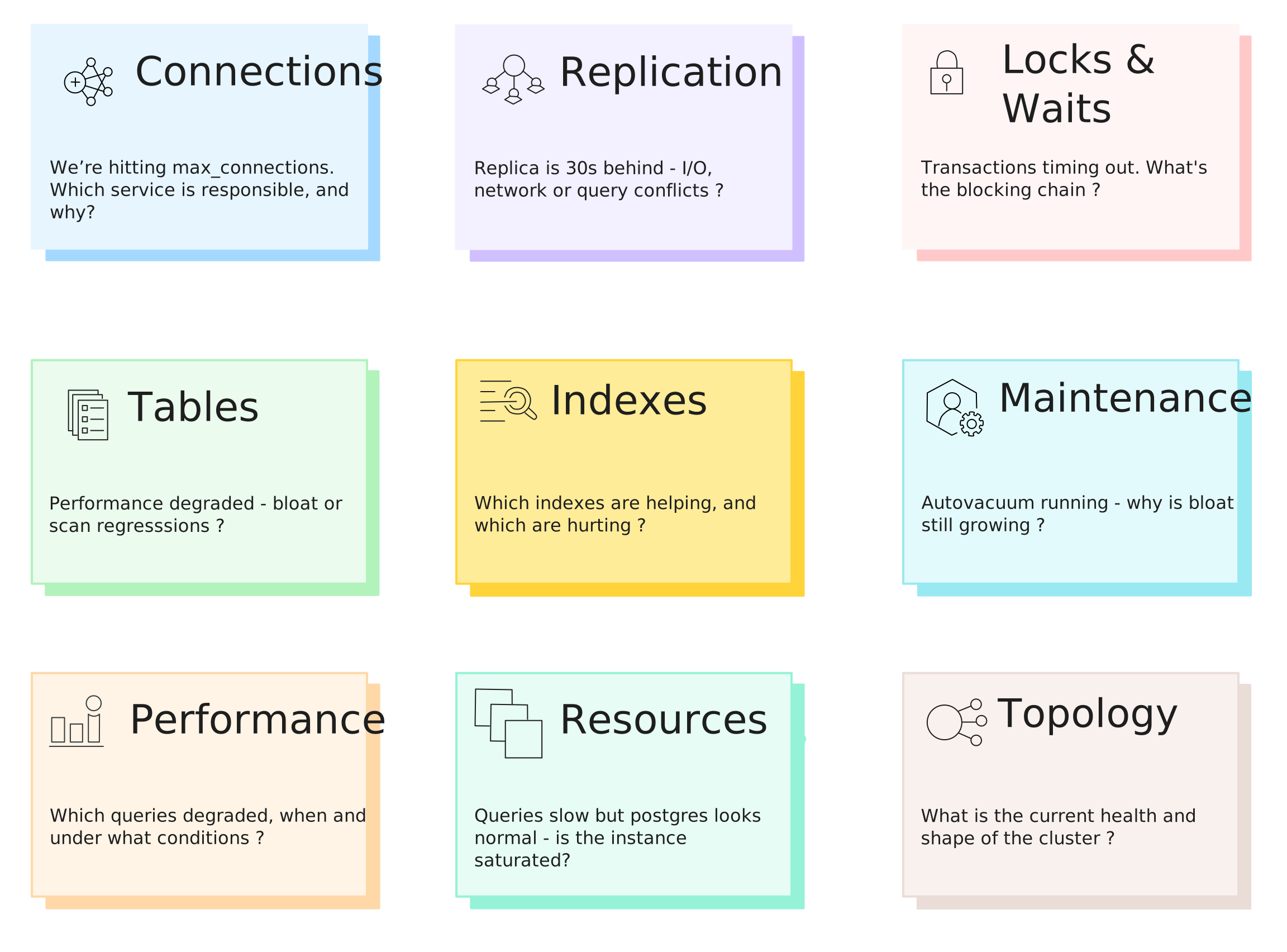
Domain 1: Connections
Connection behavior often explains system instability long before queries look slow. This is essential for PostgreSQL connection pool monitoring and capacity planning. pgX tracks connection state, ownership, and duration patterns. See the pgX Connections documentation for detailed visualizations.
| Signal | Why It Matters |
|---|---|
Total connections vs max_connections | Headroom before exhaustion |
| State breakdown (active, idle, idle in transaction) | Identifies connection leaks |
Connections by application_name | Pinpoints responsible service |
| Connection duration heatmaps | Reveals long-lived connection patterns |
pg_connections, pg_backend_type_count, pg_backend_age_seconds,
pg_backend_wait_events [1]
Key question: "We're hitting max_connections. Which service is responsible?"
Domain 2: Replication
Replication health determines both performance and reliability. Effective PostgreSQL replication lag monitoring requires visibility into multiple layers. pgX monitors lag, WAL flow, and standby conflicts across your entire topology. Explore the pgX Replication tab for standby monitoring.
| Signal | Why It Matters |
|---|---|
| Write, flush, and replay lag per standby | Pinpoints where lag occurs |
| WAL generation rate | Baseline for capacity planning |
| Replication slot state | WAL retention risk |
| Standby conflicts (snapshot, lock, buffer pin) | Explains unexpected lag spikes |
pg_replication_lag_milliseconds, pg_replication_outgoing,
pg_replication_slot_lag_bytes, pg_replication_incoming [1]
Key question: "The replica is 30 seconds behind - I/O, network, or query conflicts?"
Domain 3: Locks & Waits
Locking behavior is emergent. It arises from concurrency patterns, transaction duration, and workload shape. PostgreSQL lock monitoring and debugging lock contention requires real-time visibility. pgX surfaces blocking chains and wait events in real time. The pgX Locks & Waits view surfaces blocking chains instantly.
| Signal | Why It Matters |
|---|---|
| Lock counts by type (relation, tuple, txid, advisory) | Categorizes contention |
| Lock wait queue depth | Shows contention severity |
| Blocking session chains | Identifies who blocks whom |
| Wait event distribution (Lock, LWLock, IO, BufferPin) | Classifies wait types |
| Deadlock frequency | Detects design issues |
pg_locks_count, pg_lock_detail, pg_blocking_pids,
pg_backend_wait_events [1]
Key question: "Transactions are timing out. What's the blocking chain?"
Domain 4: Tables
Table-level health directly impacts performance and predictability. PostgreSQL bloat detection and table health monitoring are essential for performance tuning. pgX tracks bloat, cache efficiency, scan patterns, and freeze age per table. See the pgX Tables & Indexes view for detailed table health metrics.
| Signal | Why It Matters |
|---|---|
| Live vs dead tuple counts | Bloat indicator |
| Estimated bloat percentage | Maintenance urgency |
| Cache hit ratio per table | Hot vs cold data |
| Sequential vs index scan counts | Query plan efficiency |
| Row activity (inserts, updates, deletes, HOT) | Write pattern visibility |
| Freeze age | Wraparound risk |
pg_table_stats: n_live_tup, n_dead_tup, bloat_bytes, seq_scan,
idx_scan, heap_blks_hit, age_relfrozenxid [1]
Key question: "Performance degraded - bloat or scan regressions?"
Domain 5: Indexes
Indexes improve read performance but impose write overhead and maintenance cost. pgX measures index usage, efficiency, and bloat to identify optimization opportunities.
| Signal | Why It Matters |
|---|---|
| Index scan counts | Usage frequency |
| Tuples read vs fetched | Selectivity efficiency |
| Index cache hit ratios | Memory effectiveness |
| Index bloat estimates | Maintenance needs |
| Unused/rarely used indexes | Candidates for removal |
pg_index_stats: idx_scan, idx_tup_read, idx_tup_fetch, idx_blks_hit,
bloat_bytes, size_bytes [1]
Key question: "Which indexes are helping, and which are hurting?"
Domain 6: Maintenance (Vacuum & Analyze)
Maintenance debt accumulates quietly and surfaces as sudden performance regressions. Effective PostgreSQL vacuum monitoring and autovacuum monitoring prevent the silent accumulation of bloat. pgX tracks vacuum and analyze activity, dead tuple growth, and autovacuum effectiveness. Track maintenance health in the pgX Maintenance dashboard.
| Signal | Why It Matters |
|---|---|
| Last vacuum/autovacuum per table | Maintenance recency |
| Last analyze/autoanalyze per table | Statistics freshness |
| Dead tuple accumulation rate | Bloat velocity |
| Autovacuum worker activity | Worker saturation |
| Rows modified since last analyze | Stale statistics risk |
pg_table_stats: last_vacuum, last_autovacuum, vacuum_count,
autovacuum_count, n_mod_since_analyze / pg_vacuum_progress [1]
Key question: "Autovacuum is running - why is bloat still growing?"
Domain 7: Performance (Beyond Aggregates)
Performance monitoring at scale requires distributional insight, not just averages. PostgreSQL performance tuning needs more than mean latency. pgX provides percentile breakdowns, query heatmaps, and per-query drill-downs over time. Drill into query performance in the pgX Queries view and explore the pgX Performance tab.
| Signal | Why It Matters |
|---|---|
| Response time percentiles (p50, p90, p95, p99) | Tail latency visibility |
| Query heatmaps over time | Temporal patterns |
| Query type distribution (SELECT, INSERT, etc.) | Workload characterization |
| Per-query drill-downs (cache, I/O, planning, temp, WAL) | Root cause detail |
pg_statement_stats: calls, total_time_ms, avg_time_ms, rows,
shared_blks_hit, shared_blks_read, temp_blks_written [1]
Key question: "Which queries degraded, when, and under what conditions?"
Domain 8: Resources
Database performance is inseparable from the resources underneath it. pgX correlates database behavior with CPU, memory, disk, and network metrics.
| Signal | Why It Matters |
|---|---|
| CPU utilization | Compute saturation |
| Memory pressure | Buffer/cache effectiveness |
| Disk I/O throughput and latency | Storage bottlenecks |
| Network throughput | Replication/client bandwidth |
pg_system_load_avg, pg_system_memory_bytes, pg_system_swap_bytes,
pg_system_info [1]
Key question: "Queries look slow, but Postgres looks normal - is the instance saturated?"
Domain 9: Topology & Health
Operational awareness requires a coherent view of the cluster. This is foundational context for managing Postgres at scale.
| Signal | Why It Matters |
|---|---|
| Application-to-database topology | Connection flow visibility |
| Primary/replica layout | Replication architecture |
| Cluster health checks | Availability status |
| Error rates and database size | Growth and stability trends |
pg_up, pg_database_size_bytes, pg_server_version, pg_settings,
pg_database_stats [1]
Key question: "What is the current health and shape of the cluster?"
The Operational Gap
All of this data already exists inside PostgreSQL. It lives in system catalogs and views such as:
pg_stat_activitypg_stat_replicationpg_lockspg_stat_user_tablespg_stat_user_indexespg_stat_bgwriterpg_stat_wal
The challenge is its operationalization.
Teams must:
- Collect metrics at appropriate intervals
- Store them as time-series
- Build dashboards per domain
- Define meaningful alerts
- Maintain and evolve the stack as Postgres versions change
A common DIY approach looks like:
- Prometheus + postgres_exporter
- Custom SQL queries for gaps
- Grafana dashboards
- Alertmanager for notifications
This works, but comes with hidden costs:
- Partial coverage (bloat, per-query drill-downs, and maintenance are often skipped)
- Configuration drift across environments
- Tribal knowledge about which queries matter
- No prebuilt investigation workflows
- High cognitive load during incidents
This maintenance burden is a form of observability tax that compounds over time. Teams spend more effort maintaining observability than using it.
What “Comprehensive” Actually Looks Like
Comprehensive monitoring is about structured coverage, sufficient depth, and usable workflows.
In practice, this means:
- Coverage across all nine domains
- Hundreds of metrics, each with meaningful dimensions (database, table, index, user, application)
- Time-series retention that preserves behavioral trends
- Dashboards organized by operational concern, not metric type
pgX follows this model:
- Metrics are grouped into logical categories
- Each category exposes deep sub-metrics
- Dashboards are prebuilt and aligned to real investigative workflows
For example:
- Query metrics expose timing percentiles, buffer behavior, temp file usage, planning time, and WAL impact
- Table metrics include bloat, cache efficiency, scan patterns, maintenance history, and freeze age
- Index metrics surface usage effectiveness, bloat, and cache behavior
Crucially, these views are interconnected. An engineer can start from a high-level performance regression and drill down into the exact structural or operational cause without switching tools.
From Metrics to Answers
For us, the goal is to help engineers achieve faster, more confident resolution.
A representative workflow looks like this:
- Users report slow checkout requests
- Performance view shows a p95 response time spike
- Drill into Queries, filter to high-percentile latency
- Identify a degraded query
- Inspect cache hit ratio and I/O patterns for that query
- Navigate to Tables & Indexes
- Discover 40% bloat on the primary table
- Check Maintenance and see autovacuum hasn’t run recently
- Root cause identified in minutes, not hours
Alerting also becomes more meaningful:
- Compound conditions such as replication lag + read traffic
- Trend-based alerts on connection exhaustion
- Early warnings on maintenance debt
When PostgreSQL metrics share the same data lake as application telemetry, teams can move seamlessly from slow endpoints to slow queries to underlying data health.
Conclusion
Comprehensive PostgreSQL monitoring requires visibility across queries, connections, replication, locks, tables, indexes, maintenance, resources, and topology.
Teams face a choice:
- Build and maintain this visibility themselves, or
- Use tooling designed to provide it out of the box
pgX delivers structured coverage across all nine domains, with deep metrics, prebuilt dashboards, and workflows integrated into the same observability surface as application telemetry. For teams experiencing long incident resolution times, these capabilities directly help reduce MTTR. PostgreSQL does not operate in isolation. Its behavior is shaped by application code, request patterns, background jobs, deployments, and infrastructure constraints. To reliably debug production issues, engineers also need application traces, logs, and infrastructure signals in the same place, sharing the same time axis and context.
This is where unified observability matters. When PostgreSQL metrics live alongside application and infrastructure telemetry, stored in the same data lake and explored through the same interface, teams can move from symptoms to causes without stitching data across tools. Slow endpoints can be traced to slow queries, degraded queries to table bloat or lock contention, and database pressure back to application behavior or infrastructure limits.
That ability to reason about the system end-to-end is what ultimately separates surface-level monitoring from true operational understanding. You can find the technical setup in our pgX documentation, including the quickstart guide and the complete metrics reference. And if you're navigating this exact problem—figuring out how to unify database observability with the rest of your stack—we'd be interested to hear how you're approaching it.
Footnotes
1 For the complete list of pgX metrics, see the Metrics Reference.