The first pass is yours

What a product manager can now do without waiting.
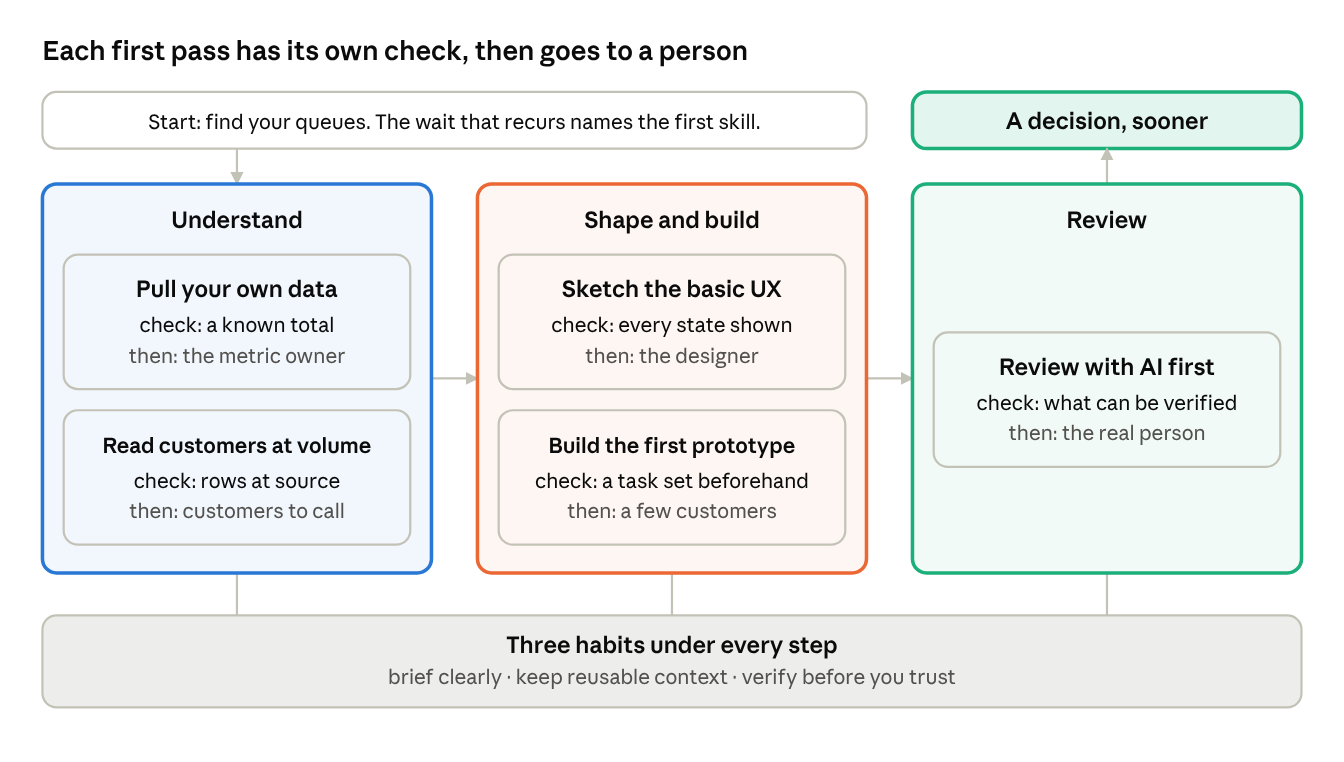
AI lets a product manager (PM) do the first pass of work they used to request from someone else: the first query, the first sketch, the first prototype and the first review. The skills behind it are older than the tools: saying precisely what you want, and knowing your product well enough to catch a first pass that is wrong.
A week that runs on requests
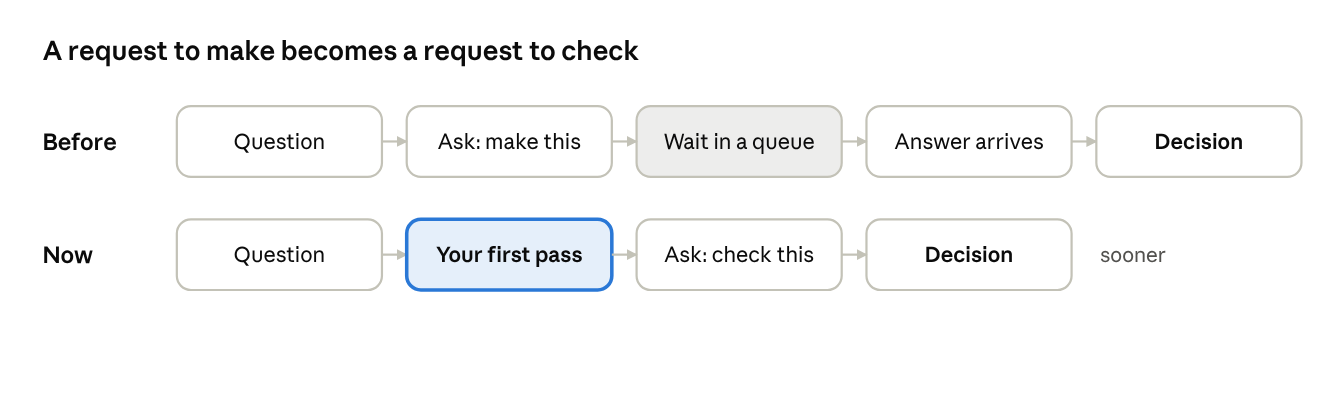
Much of a product manager's week has been spent asking. A developer pulls the data. An analyst prepares the report. A designer draws the mock-up. An engineer builds the prototype. Each request joins someone else's queue, and the decision it was meant to inform waits with it.
When the PM does the first pass, the request does not vanish. It changes from "make this" to "check this", and anything that commits money or people still gets that check. What the PM gains is evidence, sooner. The earlier article in this series argued that when building is cheap, the constraint is choosing what deserves to exist, and evidence is what a choice rests on.
Find your queues
List what you asked other people for last week, how long each answer took, and which decision waited on it. Look for the wait that recurs and holds up decisions that matter. That one names the first skill to learn.
Take a hypothetical case: a retention figure takes four days while a decision on which fix ships first sits idle. The cost of that queue is the idle decision, so start with data. Learning a new first pass can take days. Once it is familiar, give it an hour, and if you are not close, ask.
Understand
Pull your own data
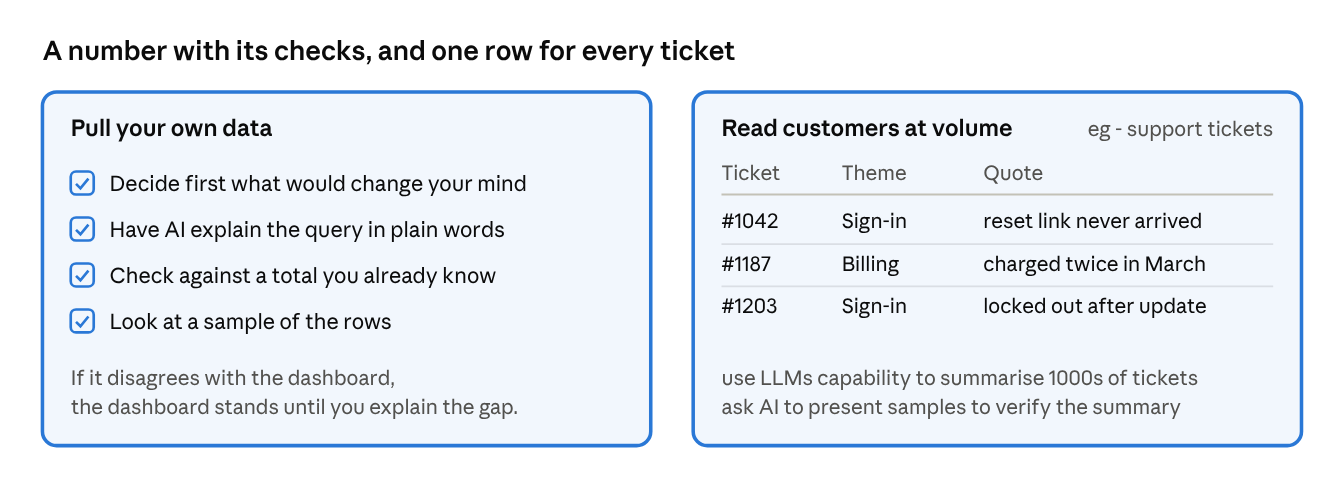
You can now describe a question in plain language, have AI write the query and run it yourself. What you need to learn is your own data, more than the query language: where it lives, what each table or event means, and how your team defines its key metrics, such as what counts as an active account.
The quickest way in starts with two last requests. Ask for read access, naming the recurring request it would take off the analyst's queue, and ask for the query behind a dashboard figure you already use. Reproduce that figure before you ask anything new. If access is refused, send the analyst the question, the decision it serves and the definition you assumed.
Before you run a query, write down what answer would change your decision. Cheap queries tempt you to keep asking until one agrees with you. Have AI explain the query in plain words: which tables it combined, which dates it covered, which accounts it left out. Check the result against a total you already know, and look at a sample of the rows. The usual faults are a customer counted twice, the wrong dates and test accounts left in.
If your number disagrees with the dashboard, the dashboard stands until you can explain the gap. When money or people will be committed on a figure, have whoever owns that metric confirm it.
Once you present a number, it is yours.
Read customers at volume
A PM can read only so many support tickets at a sitting. AI can sort thousands, along with call transcripts, interview notes and reviews.
Frame one question, such as what people were trying to do when they hit a problem. Read fifty tickets yourself and settle a short list of themes. Then have AI label every ticket against that list, in batches of a few hundred, one row each with a verbatim quote. Count the rows and re-run any batch that comes back short. Ask what did not fit any theme, and check a sample of rows against the source, label as well as quote.
Ticket volume shows who complains, which is different from how common a problem is. The output tells you which customers to call next.
Shape and build
Sketch the basic UX
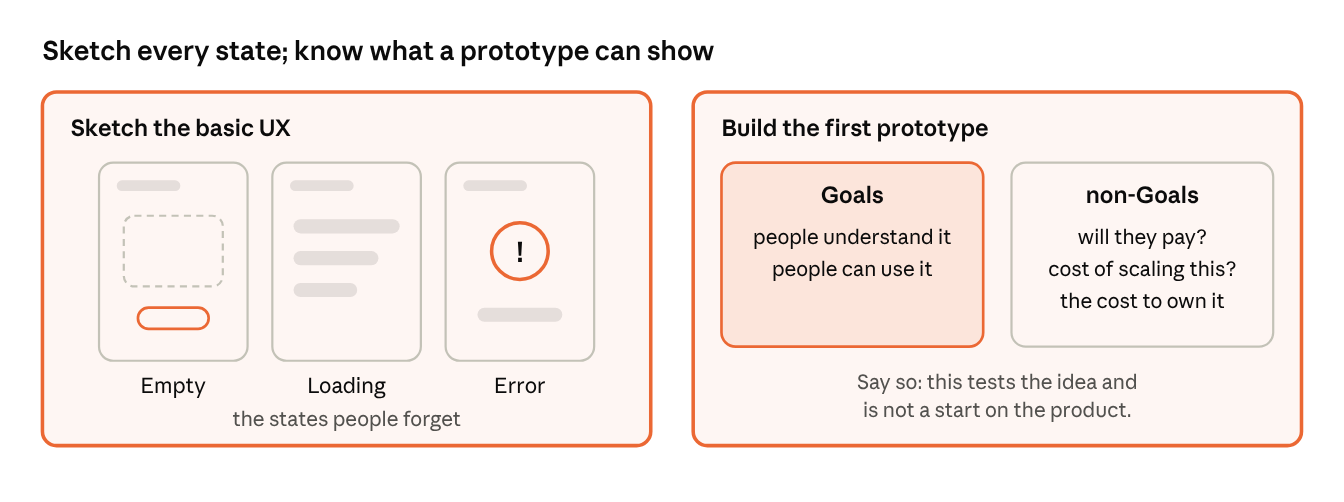
Describe a flow in words and AI can turn it into rough screens. Say who the user is, where they start, each step they take and what can go wrong at each one. Name the states people forget: the empty screen, the loading screen, the error.
So that the sketch reuses what your product already does, learn the names of the components in your design system. Ask a designer what they are called, add the list to the context you keep for AI, and name them in your brief. Ask for two or three alternatives and note what each one trades away. Then ask the designer which one they would start from, and why.
Build the first prototype
A working prototype shows what a feature is like to use. Building one is mostly specifying behaviour: what happens when the user does this, and what happens when they do something else. Set a time limit before you start. Describe one screen and have AI build it, then one working button, and try each step before adding the next. Use realistic sample data. When a step fails, have AI explain what it changed before you accept another change.
Know where a prototype ends. It can show whether customers understand the idea and can use it. It cannot show that they will pay for it, and it says nothing about security, scale or what the feature would cost to own. Say so to the team and to the customer: this tests the idea and is not a start on the product.
Before each customer session, write down the task you will set and what you would need to see to drop the idea.
Review
Review with AI before the team sees it
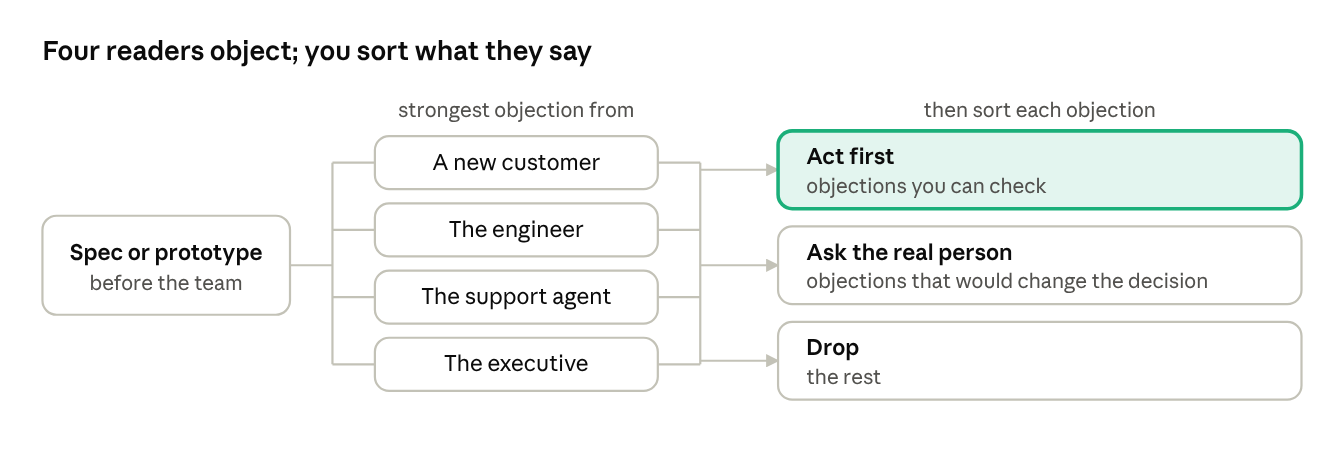
Before a spec or prototype reaches the team, have AI read it as particular people: a new customer, the engineer who would build it, the support agent who would field the tickets, the executive who would fund it. Give each one your product context, or the objections will be generic. Ask each for their strongest objection, and ask the executive which assumption they would want evidence for. A request for general feedback gets general praise.
Then choose which criticism to act on. Act first on objections you can check: a customer case, a number, a step that fails. Ask of the rest whether, if true, they would change the decision. Take those that would, as one specific question, to the real person the reviewer imitates, or to your manager if you cannot reach them. Drop the others.
Three habits under every step
Brief clearly
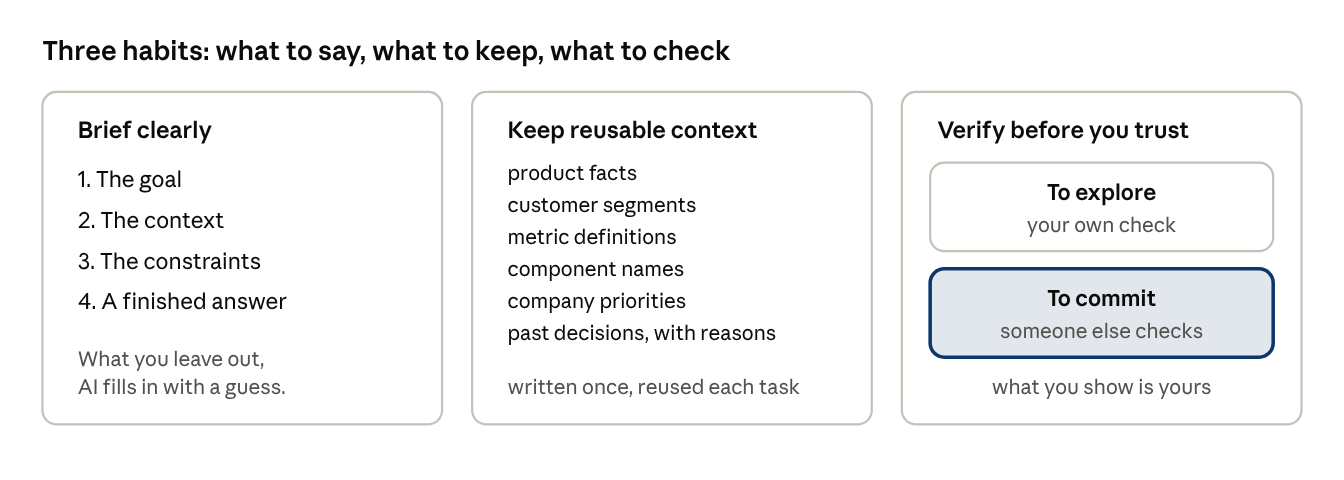
A brief has four parts: the goal, the context, the constraints and what a finished answer looks like. Whatever you leave out of the request, AI will fill in with a guess.
Keep reusable context
Write down once what every task needs: the product's facts, the customer segments, the metric definitions, the component names, the company's priorities and the past decisions with their reasons. Hand that to AI at the start of each task.
Verify before you trust
Fluent output looks right whether or not it is, so each step above has its own check. Your own check is enough to explore. Before money or people are committed, get someone else's. Whatever you show the team is yours, whoever drafted it.
A test for next week
- Which decision waited last week on a first pass I could have done myself?
- Did I check the last number or summary AI gave me against something I trust?
- Did I write down beforehand what result would change the decision?
- Did the last thing I showed the team get a hard review before they saw it?
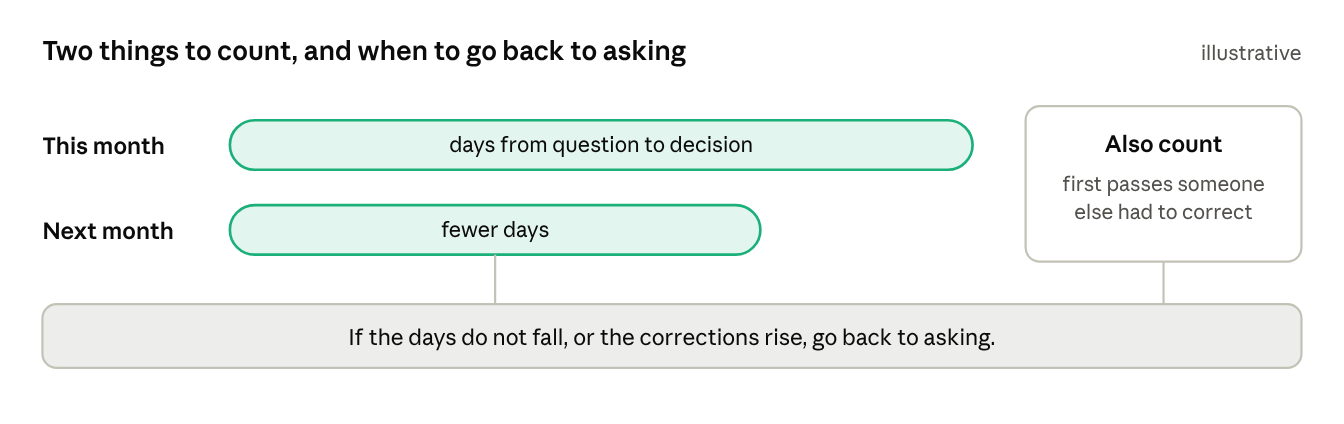
Each first pass sends you to a real person sooner, with a sharper question. Count the days from question to decision this month and next, and how many of your first passes someone else had to correct. If the days do not fall, or the corrections rise, go back to asking.