Flutter Mobile Observability
Mobile apps face observability challenges that backend services do not: devices run on battery, connectivity is unreliable, and the OS can kill your app at any time. OpenTelemetry gives you traces, metrics, and error data from your Flutter app exported to any OTLP-compatible collector.
This guide walks you through choosing an instrumentation approach, adding dependencies, wiring telemetry into your app, and verifying that spans reach your collector.
Time to Complete
15-20 minutes
What You'll Accomplish
- Choose between automatic RUM and manual SDK instrumentation
- Add OpenTelemetry dependencies to your Flutter project
- Initialize telemetry in your app entry point
- Verify spans are flowing to your collector
Prerequisites
- Flutter SDK 3.32.0+ and Dart SDK 3.9.2+ installed
- A running OpenTelemetry Collector with an OTLP endpoint (see Docker Compose Setup for local development)
- An existing Flutter app to instrument
Telemetry Architecture
Before instrumenting your app, decide how telemetry gets from the device to Base14. There are two deployment models.
Recommended: OTel Collector with API Gateway
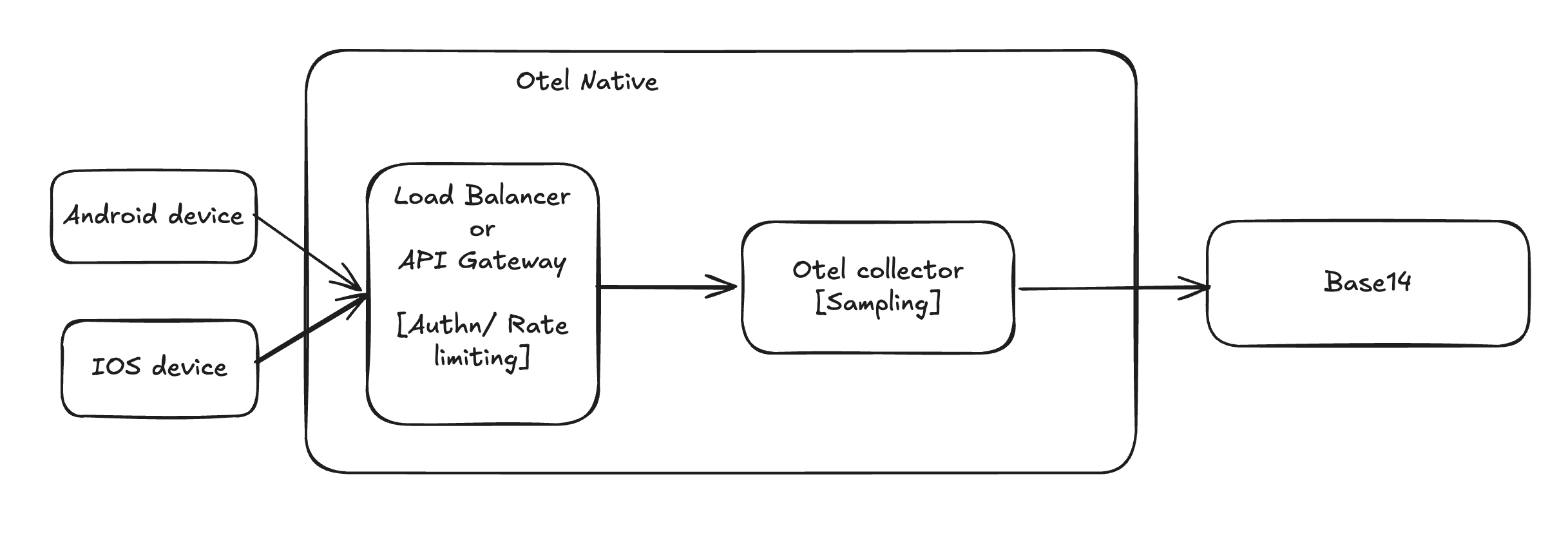
Devices send OTLP data to a load balancer or API gateway, which handles authentication and rate limiting. The gateway forwards traffic to an OTel collector that applies server-side sampling before exporting to Base14.
Alternative: Direct to Base14
Devices send OTLP data directly to the Base14 ingestion endpoint, authenticating with OAuth tokens that the app manages.
Comparison
| Collector + API Gateway | Direct to Base14 | |
|---|---|---|
| Authentication | API gateway handles auth centrally — app only needs an API key or static token | App must manage OAuth token lifecycle (acquire, refresh, retry on 401) |
| Credential security | Credentials stay on your infra — app ships a lightweight key that the gateway validates | OAuth client secret must be embedded or fetched at runtime — risk of extraction from APK/IPA |
| Rate limiting | API gateway enforces per-device or per-app rate limits — protects backend from traffic spikes | No rate limiting — a buggy release can flood Base14 with telemetry |
| Server-side sampling | OTel collector applies tail sampling (e.g. keep all errors, sample 10% of healthy spans) — reduces cost without losing signal | All sampling must happen on-device — you lose the ability to make sampling decisions with full context |
| Buffering and retry | Collector buffers and retries on export failure — device fire-and-forget | App must handle retry logic and local buffering if Base14 is unreachable |
| Schema evolution | Collector processors can rename attributes, drop PII, or add resource attributes without app updates | Any schema change requires an app release and user update |
| Network efficiency | Gateway can terminate TLS at the edge, compress, and batch — lower overhead per device | Each device opens its own TLS connection to Base14 — more overhead at scale |
| Operational cost | Requires running a collector and gateway (but these are standard infra components) | No additional infra to manage |
| Deployment complexity | Moderate — collector + gateway config | Low — just configure the Base14 endpoint in the app |
| Best for | Production apps with multiple devices, teams that want control over sampling and PII | Prototypes, internal tools, or apps with a small user base |
Use the Collector + API Gateway approach for production apps. The ability to rate limit, sample server-side, strip PII, and rotate credentials without app updates far outweighs the small infra cost. Reserve Direct to Base14 for prototypes or internal tools where simplicity matters more than control.
Step 1: Choose Your Approach
Two instrumentation paths are available. Pick the one that fits your needs.
| Flutterific RUM | Manual SDK | |
|---|---|---|
| Package | flutterrific_opentelemetry | opentelemetry |
| Session tracking | Automatic | Manual |
| Device/app/network context | Automatic on every span | Manual |
| Navigation spans | Automatic | Manual |
| Screen load/dwell times | Automatic | Not included |
| Cold start measurement | Automatic | Manual |
| Jank/ANR detection | Automatic | Not included |
| HTTP tracing | Via RumHttpClient wrapper | Via HttpService wrapper |
| W3C trace context propagation | Automatic (traceparent header) | Automatic |
| Battery-aware sampling | Automatic (4-tier adaptive) | Automatic |
| Breadcrumb trail | Automatic (last 20 actions on error spans) | Not included |
| Error boundary widget | Included | Not included |
| Flush on background | Automatic (AppLifecycleListener) | Manual |
| Conversion funnel tracking | Not included | Via FunnelTrackingService |
| Custom spans and events | Supported | Supported |
| Best for | RUM dashboards, UX monitoring | Backend correlation, fine-grained control |
Decision guide: Use Flutterific RUM if you want session-level UX monitoring (jank, screen times, navigation, breadcrumbs, battery-aware sampling) with minimal code. Use the Manual SDK if you need conversion funnel tracking or full control over span creation and batching.
Full reference docs:
Step 2: Install Dependencies
Add the packages for your chosen approach.
Flutterific RUM:
dependencies:
  flutterrific_opentelemetry: ^0.3.2
  device_info_plus: ^11.0.0
  package_info_plus: ^8.0.0
  connectivity_plus: ^6.0.0
  battery_plus: ^6.0.0
Manual SDK:
dependencies:
  opentelemetry: ^0.18.10
  http: ^1.1.0
  uuid: ^4.0.0
  flutter_dotenv: ^6.0.0
  device_info_plus: ^11.3.3
Then install:
flutter pub get
Step 3: Initialize Telemetry
Both approaches initialize telemetry before runApp(). Below are the minimal
entry points — see the reference docs for the complete file listings.
Flutterific RUM — create lib/main_otel.dart:
import 'package:flutter/material.dart';
import 'package:flutterrific_opentelemetry/flutterrific_opentelemetry.dart';
import 'main.dart';
import 'otel/otel_config.dart';
import 'otel/rum_cold_start.dart';

Future<void> main() async {
  RumColdStart.markMainStart();
  await OTelConfig.initialize();
  WidgetsBinding.instance.addObserver(OTelConfig.lifecycleObserver);
  runApp(const MyApp());
  RumColdStart.measureFirstFrame();
}
Note: The full
lib/otel/directory with all supporting files is documented in the Flutterific RUM reference.
Manual SDK — wrap your existing main() in runZonedGuarded:
import 'dart:async';
import 'package:flutter/material.dart';
import 'services/telemetry_service.dart';

void main() {
  runZonedGuarded(() async {
    WidgetsFlutterBinding.ensureInitialized();
    await TelemetryService.instance.initialize();
    runApp(const MyApp());
  }, (error, stack) {
    TelemetryService.instance.recordCrash(error, stack);
  });
}
Note: The full
TelemetryService,MetricsService, andLogServiceimplementations are documented in the Manual SDK reference.
Run the app with the appropriate entry point:
# Flutterific RUM
flutter run --target=lib/main_otel.dart

# Manual SDK (default entry point)
flutter run
Step 4: Verify Telemetry
Once the app is running, confirm spans are reaching your collector.
-
Check collector logs — look for incoming OTLP requests:
docker logs otel-collector 2>&1 | grep -i "traces" -
Look for expected span names — depending on your approach:
- Flutterific RUM:
app.cold_start,navigation.push,screen.load,screen.dwell,jank.frame - Manual SDK:
GET /api/products,screen_view,device.app.lifecycle
- Flutterific RUM:
-
Open Scout — navigate to the Traces view and filter by
service.name = your-app-name. You should see spans arriving within 30 seconds of app activity.
Troubleshooting: If no spans appear, check that the
OTEL_TRACE_ENDPOINTenvironment variable or hardcoded endpoint matches your collector's OTLP receiver address. See Troubleshooting Missing Telemetry Data for common issues.
Next Steps
- Flutter RUM with Flutterific — full reference for automatic RUM instrumentation
- Flutter OpenTelemetry (Manual SDK) — full reference for manual SDK instrumentation
- Create Your First Dashboard — build dashboards from your mobile telemetry data
- Creating Alerts with LogX — set up alerts on crash rates, ANR counts, or slow screen loads
- Troubleshooting Missing Telemetry Data — diagnose issues when spans are not arriving