Introduction
Scope is an LLM engineering platform for centralized prompt management, testing, and deployment. Built on top of Scout's OpenTelemetry data lake, Scope gives engineering teams a single place to version, test, and promote prompts — from first draft through production.
Key Features
- Centralized Prompt Management: Create and organize prompts in a shared workspace with full visibility across your team
- Version Control & Promotion: Track every change to a prompt with immutable versions and promote tested versions through staging to production
- Prompt Testing & Evals: Run prompts against test cases and evaluation criteria before deploying to production
- Provider Management: Configure and switch between LLM providers (OpenAI, Anthropic, Google, AWS Bedrock, and more) without code changes
- Trace Integration: Correlate prompt executions with Scout's distributed traces, logs, and metrics for end-to-end observability
- SDK Access: Fetch prompts at runtime using lightweight SDKs so your application always uses the latest promoted version
Architecture
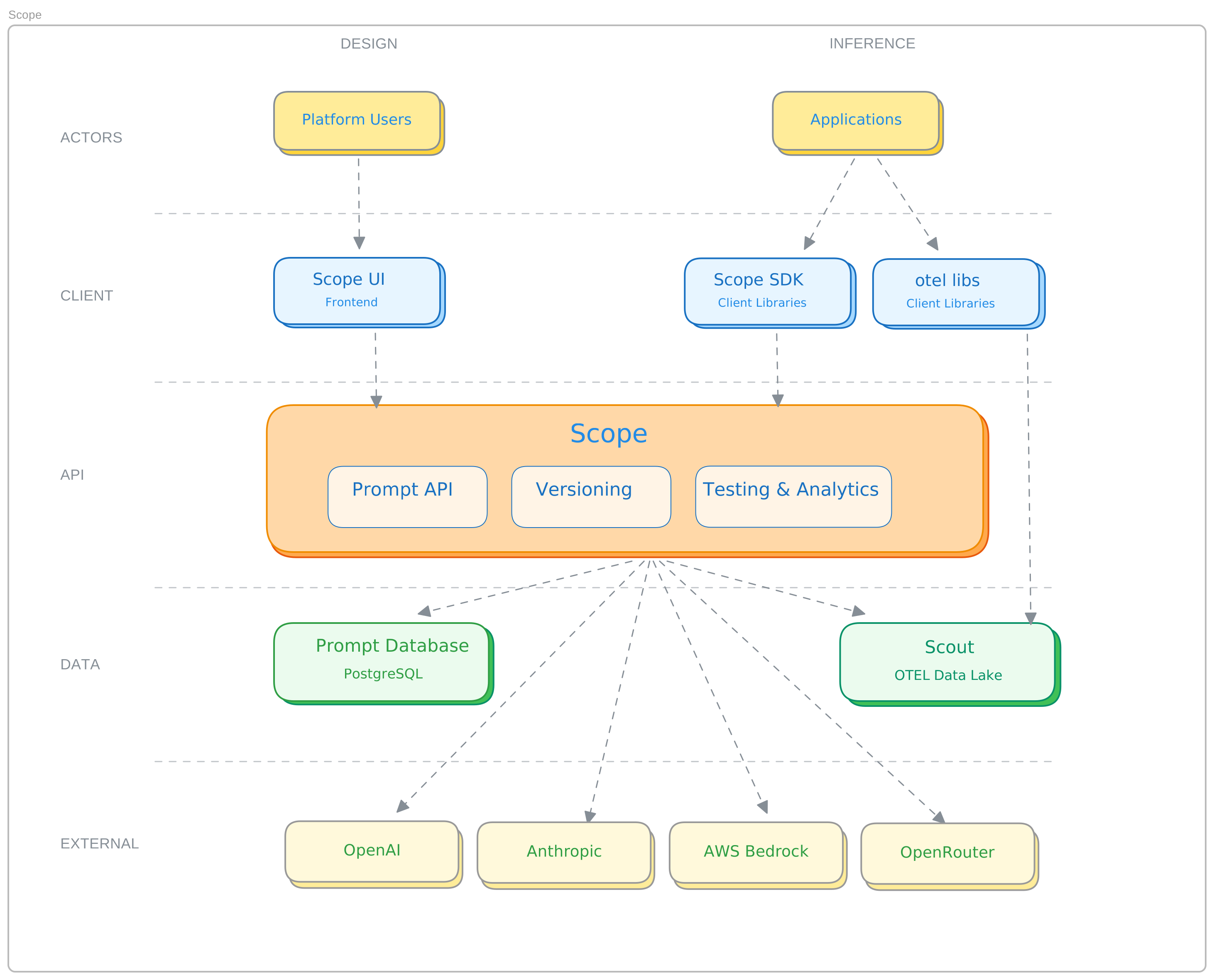
- Prompts are authored and tested in the Scope UI, then promoted through environments (staging → production)
- Applications fetch the active prompt version at runtime via the Scope SDK or API
- Every prompt execution is recorded as an OpenTelemetry span, feeding into Scout's unified telemetry pipeline
- Provider credentials are managed centrally, so switching models requires no application redeployment
Getting Started
Set up Scope in a few steps:
- Sign in to Scope: Access the Scope UI from your base14 dashboard. Scope is available to all base14 accounts.
- Configure a provider: Add your LLM provider credentials (e.g., OpenAI API key) under Settings → Providers.
- Create a prompt: Open the prompt editor and create your first prompt with a system message and user template.
- Test it: Use the built-in playground to run your prompt against sample inputs and review the output.
- Promote to production: Once satisfied, promote the tested version to your production environment.
- Use in your app: Integrate the Scope SDK to fetch and execute prompts at runtime. See the SDK for language-specific guides.
Related Guides
- Quick Start — Get your first prompt running in under 5 minutes
- Core Concepts — Understand prompts, versions, variables, and promotion
- Configure Providers — Configure LLM provider credentials
- SDK — Integrate Scope into your application
- API Reference — REST API endpoints and authentication
- Architecture — System components and data flow
Was this page helpful?